Unlocking Spooky Sparkle: A Practical Guide to Halloween Rhinestone Templates
The allure of a custom, sparkling Halloween design is undeniable. Whether it’s a skeleton hand on a tote bag or a glittering pumpkin on a sweatshirt, adding dimension and shine to seasonal crafts elevates them from ordinary to extraordinary. However, for many crafters, the prospect of creating these designs from scratch is daunting. This is where Halloween Rhinestone Templates become a game-changer, offering a rare and specialized design solution that saves time, ensures precision, and delivers professional-quality results for your spooky projects.
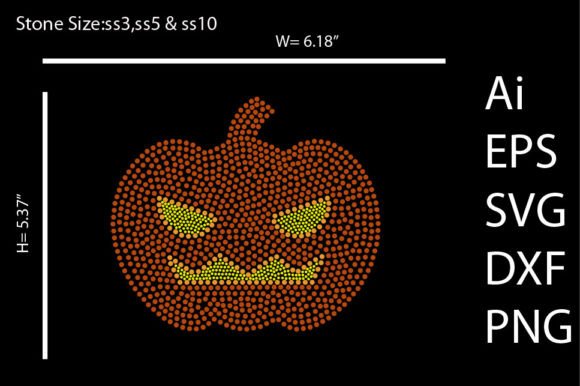
When you purchase a high-quality template set, you are not just buying a picture; you are investing in a versatile digital toolkit. A comprehensive package typically includes multiple file formats to ensure compatibility with your specific cutting machine and software. Understanding what each file does is the first step to avoiding frustration. You will usually receive an SVG file for Cricut Explore and Silhouette Designer Edition, a DXF file for those using the free version of Silhouette Studio, and an EPS or Ai file for users of Adobe Illustrator, Corel Draw, or Inkscape. Additionally, high-resolution PNG and JPEG files are included for standard printing needs. This variety ensures that whether you are using a professional cutting machine or simply printing a design, you have the correct format at your fingertips.
Avoiding the Pitfalls of File Compatibility
One of the most common mistakes beginners make is assuming all digital files work the same way across all platforms. Downloading an SVG file and trying to open it directly in the free version of Silhouette Studio, for example, will lead to an error message and immediate frustration. The free software version requires the DXF format, while the Designer Edition unlocks SVG capabilities. To avoid this, identify your software version before you start your project. If you are unsure, start with the DXF file if you are on a free software tier. Conversely, if you are using Adobe Illustrator for complex edits, ensure you are utilizing the native .ai or .eps vector files to maintain scalability and editability without losing quality.
The Critical Difference Between Rhinestone and Print Designs
A significant misunderstanding in the crafting community is treating rhinestone templates like standard print designs. A Halloween Rhinestone Template is distinct because it is designed to create a physical structure for holding "bling." These designs are composed of circles representing stone sizes rather than solid lines. If you attempt to print a rhinestone template directly onto a t-shirt using a standard inkjet printer, the result will look like a pattern of empty circles rather than a solid image.
The correct application involves using the template to cut a stencil out of flock or plastic material, applying the stones, and then heat pressing the finished transfer onto your garment. If you are looking for a solid image for mugs or cushions, you must use the provided PNG or JPEG files, which are flattened, high-resolution images intended for sublimation or direct-to-garment printing. Mixing these up wastes materials and leads to disappointing results. Always verify the file description to ensure you are using the "printable" version for paper projects and the "cut" version for rhinestone projects.
Preparation and Material Selection
Even with the perfect file, poor preparation can ruin a project. A frequent oversight is failing to mirror the design when working with heat transfer vinyl (HTV) or rhinestone transfers. Since you are pressing the design face-down onto the fabric, a non-mirrored design will result in backward text or images. Most cutting software has a simple "Mirror" or "Flip Horizontally" button—make it a habit to check this before hitting "Cut."
Furthermore, selecting the wrong rhinestone size can drastically alter the look of your Halloween Rhinestone Templates. A design optimized for SS10 stones will look vastly different if you attempt to use SS16 stones without resizing the template. The stones will overlap or leave gaps. Before purchasing or cutting, check the recommended stone sizes provided in the product description. If you are a beginner, it is often safer to stick to the recommended size (usually SS10) as it offers a good balance of coverage and detail without being overly complex to place.
Maximizing the Value of Your Purchase
Since these are digital products, many sellers, including myself, offer these as a "rare design" meant to provide unique value. To get the most out of your purchase, treat the files as a starting point. The editable nature of these files means you can customize colors, combine elements, or adjust sizing to fit specific projects like onesies or XL hoodies. Do not be afraid to experiment with different color combinations for the rhinestones; a neon green and black palette can look just as striking as the traditional orange and black.
Finally, always test your settings. Before committing to a large piece of rhinestone template material, do a small test cut with your machine. Adjusting the blade depth and pressure ensures a clean cut through the flock material, which is essential for the rhinestones to stay in place during the application process. By taking the time to understand your files, prepare your materials, and test your equipment, you transform a simple digital download into a professional, sparkling masterpiece that captures the spirit of the season.