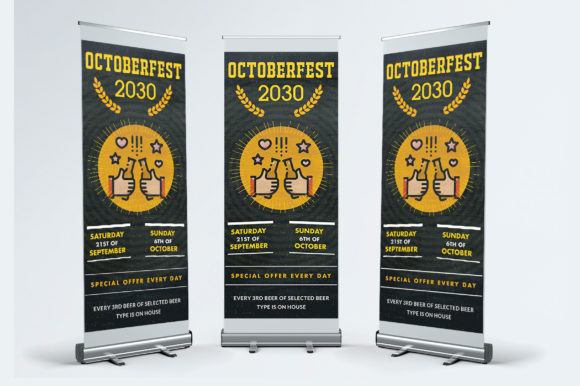
Festival Roll Up Banner Templates Design for Any Project
When you are planning a visual display for an event, whether it is a local food fair, a corporate trade show, or a community art exhibition, the physical presence of your brand matters. You need a solution that is not only visually striking but also logistically simple. The Festival Roll Up Banner Templates Design offers a specific approach to this challenge, providing a standardized, print-ready framework that bridges the gap between a digital concept and a physical display. This layout is designed to be versatile enough for corporate needs while retaining the energy required for festival environments.
Understanding the Foundation: What is This Template?
At its core, a roll-up banner template is a pre-structured design file intended for large-format printing. This specific package is built around a 31”x71” dimension, which is a standard industry size for retractable banners. However, the value lies in the technical specifications included. The files are delivered in PSD format, meaning they are fully layered Adobe Photoshop documents. This allows for granular control over every element, from the background texture to the headline typography.
The design is prepared in CMYK color mode, which is essential for accurate color reproduction in print, and set at 150 DPI resolution. While web designers often work at 72 DPI for screens, 150 DPI is the standard for large-format prints where viewing distances are greater, ensuring the file size remains manageable while maintaining visual clarity. The inclusion of a "help.txt" file suggests a user-centric approach, guiding those who may be less familiar with print specifications through the customization process.
Why Different Professionals Care About This Layout
The utility of a Festival Roll Up Banner Templates Design extends far beyond simple decoration. It serves as a strategic asset for various groups, each evaluating the template through a different lens of priority.
For the Entrepreneur and Small Business Owner
For a small business owner, budget and speed are often the primary concerns. Hiring a graphic designer to create a banner from scratch can be costly and time-consuming. This template offers a middle ground. It provides a professional skeleton without the high agency fees.
- Priority: Cost and Reliability. The owner needs to know that the file will print correctly without technical errors that waste expensive ink or vinyl. The "print-ready" nature of the file mitigates this risk.
- Use Case: A local bakery participating in a weekend market can use this template to quickly display their menu and contact info. The grouped layers make it easy to swap out a placeholder image for a high-quality photo of their signature sourdough loaf.
For Marketing Professionals and Agencies
Experienced marketers view templates differently. They are not looking for a design to use "as-is," but rather a flexible canvas. The grouped and layered PSD structure is critical here. It allows a marketing team to maintain brand consistency by easily inserting approved color palettes and vector logos.
- Priority: Flexibility and Editability. The ability to resize elements without losing quality (using smart objects in Photoshop) is paramount.
- Use Case: An agency managing multiple clients at a corporate conference can use this single template structure to create distinct banners for three different clients, simply by changing the imagery and text while keeping the layout hierarchy consistent.
Educators and Community Organizers
For educators, the aesthetic might be secondary to clarity. However, a well-designed banner can significantly increase engagement at a school fair or a library event. The Festival Roll Up Banner Templates Design provides a clean structure that helps organize information logically, guiding the viewer’s eye from the headline to the call to action.
- Presentation and Accessibility. Educators need text to be readable from a distance. The 31” width allows for large typography, ensuring that vital information (like event schedules) is legible.
- Use Case: A university department setting up a booth for student orientation can use this template to highlight programs. The ease of use means student volunteers can handle the text updates without needing advanced design skills.
Technical Deep Dive: Ease of Use vs. Professional Control
One of the most significant selling points of this product is the balance between ease of use and professional control. The description notes that the files are "Grouped layered." This is a crucial distinction from "flattened" files.
The Power of Grouped Layers
For a beginner, a Photoshop file can look intimidating. However, grouped layers act like folders within the file. Instead of seeing hundreds of individual layers for every shadow, shape, and text element, the user sees organized categories like "Header," "Body Text," and "Background." This structure allows a beginner to expand a group, find the specific text they want to change, and edit it without accidentally moving the background image.
For the professional, this grouping allows for rapid iteration. They can toggle entire sections of the design on or off to test different layouts, or apply color overlays to specific groups to see how the design responds to different brand guidelines.
The "Photos Not Included" Factor
A common point of friction in template usage is the imagery. This template explicitly states that photos are not included. While this might seem like a drawback to a complete novice, it is actually a benefit for quality control. Stock photos included in templates are often overused or low-resolution.
By providing a clean slate for imagery, the Festival Roll Up Banner Templates Design forces the user to upload their own high-quality, relevant photos. This ensures the final banner looks unique to the business or event, rather than looking like a generic stock photo collage. It shifts the focus from "what the template looks like" to "what the template can become."
Practical Applications Across Industries
The versatility of this layout allows it to adapt to various project purposes. The "corporate" aspect of the design implies a certain level of professionalism and structure—clean lines, clear typography hierarchy, and balanced white space.
Trade Shows and Exhibitions
This is the most obvious application. In a crowded hall, you have roughly three seconds to capture the attention of a passerby. The vertical orientation of a roll-up banner is ideal for this. The design template likely utilizes the "Z" or "F" reading pattern, placing the most critical information (the hook) at the top third of the banner, where it is visible over the heads of a crowd.
Retail Pop-Ups and In-Store Signage
For retailers, these banners are not just for festivals. They can be used inside stores to highlight a seasonal sale or a new product line. Because the template is print-ready, a store manager can order a new banner every season, swapping out the content while maintaining the same structural layout. This creates a cohesive brand experience over time.
Workshops and Seminars
Freelancers and educators hosting workshops can use these banners as a backdrop for their stage or registration table. It adds a layer of legitimacy to the event. Even if the event is small, a professional banner signals to attendees that the organizer takes the event seriously.
Evaluating if This Template Fits Your Goals
How do you know if this specific Festival Roll Up Banner Templates Design is right for you? It comes down to your current skill set and your project requirements.
- Do you have access to Adobe Photoshop? Since the file is PSD, you will need the software to edit it. If you do not have Photoshop, this specific template will not work for you.
- Do you need a specific size? The 31”x71” size is standard, but if you have an existing stand that requires a different width, you will need to be comfortable resizing the canvas, which can affect the aspect ratio of the design.
- Are you comfortable with basic editing? While the layers are grouped, you still need to know how to select a type tool and change a font. If you are looking for a web-based drag-and-drop solution, a PSD file is not the answer. However, if you want high-resolution output and control over the final pixel, PSD is the industry standard.
Conclusion
The Festival Roll Up Banner Templates Design serves as a bridge between amateur efforts and professional results. It democratizes high-quality design by providing the structural foundation—the bleed, the resolution, the color mode—so that the user can focus on the content. Whether you are a seasoned marketer needing a quick turnaround for a client or a small business owner preparing for your first big festival, this template offers a reliable, customizable, and professional starting point for your visual communication.