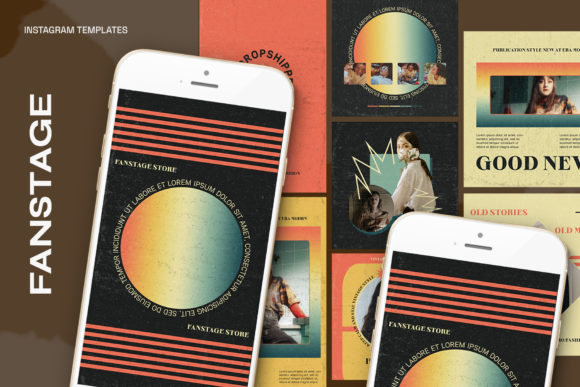
Optimizing Instagram Visuals with Fanstage Templates and Smart Object Technology
The Technical Foundation of Professional Social Media Assets
In the competitive landscape of digital marketing, the visual quality of social media assets plays a decisive role in audience retention. The Fanstage Instagram Templates represent a specific approach to graphic design that prioritizes resolution and color fidelity. When creating content for high-definition displays, the configuration of 300 DPI (dots per inch) and RGB (Red, Green, Blue) color mode is essential. These specifications ensure that the resulting images are not only sharp but also color-accurate across various device screens. The inclusion of dimensions such as 1200 x 1200 pixels and 1920 x 1080 pixels indicates a versatility that spans from standard square posts to landscape video or story formats.
Understanding the PSD File Structure
The core of the Fanstage Instagram Templates workflow lies within the 1.13 PSD file format. PSD, or Photoshop Document, is the native file format for Adobe Photoshop. It preserves the editing capabilities of the project, allowing users to manipulate layers, masks, and effects non-destructively. For professionals, the ability to edit all text using the standard text tool is a critical feature. This ensures that typography can be customized to match specific brand guidelines without the need for complex workarounds. The design structure separates visual elements from the background, creating a flexible environment for customization.
Streamlining Design Workflows with Smart Objects
A defining characteristic of the Fanstage Instagram Templates is the implementation of Smart Objects. In the context of graphic design, a Smart Object is a container layer that holds image data from raster or vector images. This technology allows for non-destructive scaling and transformation. When working with these templates, the process of inserting an image is significantly simplified through the "Double Click" method. By clicking the layer icon on the image group, the user opens a separate canvas where the desired image can be placed.
The workflow described—placing an image and pressing CTRL+S (or Command+S on Mac)—highlights the efficiency of the system. Once the file is saved in the Smart Object window, the main template automatically updates to reflect the changes, applying any predefined masks, effects, or distortions to the new image. This mechanism is particularly beneficial for creators who need to maintain a consistent aesthetic while frequently updating content. It eliminates the need to manually resize or crop images to fit specific frames, thereby reducing the time spent on technical adjustments.
Strategic Applications for Diverse Audiences
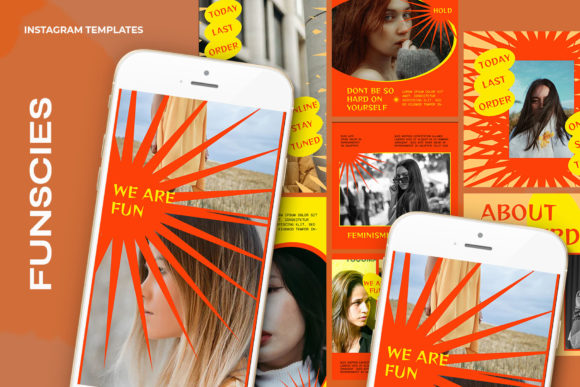
The utility of the Fanstage Instagram Templates extends across various sectors. For business owners and marketing professionals, these templates provide a framework for maintaining brand consistency. The ability to edit text easily allows for the rapid creation of promotional materials, announcements, and seasonal campaigns. Since the model is not included, the focus remains on the user's original content, which is a crucial aspect of authentic branding.
Educators and researchers can utilize the 1920 x 1080 px dimensions to create informative infographics or presentation slides that can be shared directly on social media platforms. The high DPI ensures that text-heavy graphics remain legible even when compressed by social media algorithms. Hobbyists and content creators benefit from the "Easy to use" nature of the files, allowing them to produce professional-grade visuals without advanced technical skills. The structure of the file supports a plug-and-play approach where the creative effort is focused on content selection rather than technical construction.
Visual Integrity and Resolution Standards
The specification of 300 DPI is a standard often associated with print media, but its inclusion in digital templates suggests a commitment to high fidelity. While standard web resolution is typically 72 DPI, higher resolution assets provide a buffer against quality loss during compression or when viewed on retina displays. The RGB color mode is the standard for digital screens, ensuring that the colors displayed on the monitor during the design process translate accurately to the final output on Instagram.
The dimensions offered—1200 x 1200 px for square posts and 1920 x 1080 px for landscape or video covers—align with current platform standards. However, the true value lies in the scalability of the vector elements and the Smart Object layers within the PSD file. Users can often adjust these dimensions without significant loss of quality, provided the source images placed within the Smart Objects are of sufficient resolution.
Technical Considerations for Implementation
When integrating the Fanstage Instagram Templates into a production pipeline, several technical factors must be considered. The requirement for Adobe Photoshop to utilize the PSD files means that users must have access to this software. While the workflow is streamlined, the dependency on the "Double Click" mechanism requires a basic understanding of the Photoshop interface.
Furthermore, the note that the "Model not included" is a significant detail for commercial use. It indicates that the templates are designed to be populated with the user's own photography or stock images. This removes potential licensing issues associated with using pre-included models and allows for greater creative control. Users must ensure that the images they place into the Smart Objects are high-resolution to match the 300 DPI setting of the template. Placing a low-resolution image into a high-resolution container will result in pixelation, undermining the technical quality of the template.
Enhancing Engagement through Consistency
Consistency is a key driver of engagement on social media platforms. The Fanstage Instagram Templates facilitate this by providing a uniform structure for visual content. By using the editable text tools, users can create a cohesive series of posts that share the same visual language but convey different messages. This is particularly useful for storytelling or multi-part educational series where visual continuity helps the audience follow the narrative.
The ease of use allows for A/B testing of visuals. A creator can quickly swap out the background image in a Smart Object while keeping the text and layout constant to determine which visual resonates more with their audience. This rapid iteration capability is a strategic advantage in the fast-paced environment of social media marketing. The templates serve not just as design tools, but as instruments for data-driven content optimization.
Conclusion on Workflow Efficiency
The integration of Smart Object technology within the Fanstage Instagram Templates fundamentally alters the design workflow. By decoupling the placement of imagery from the layout structure, the templates allow for a modular approach to content creation. The specific technical parameters—1.13 PSD, 300 DPI, RGB, and specific pixel dimensions—provide a robust foundation for high-quality output. For the broad audience of creators, professionals, and business owners, these features translate into a practical solution for producing visually compelling and technically sound social media content.